


Placing a GTT order on the Samco app is straightforward. Here is how:
- Search for the stock you want to trade from the Home screen or open it from your Watchlist
- Tap on the stock to open its detail page
- Tap the Buy or Sell button
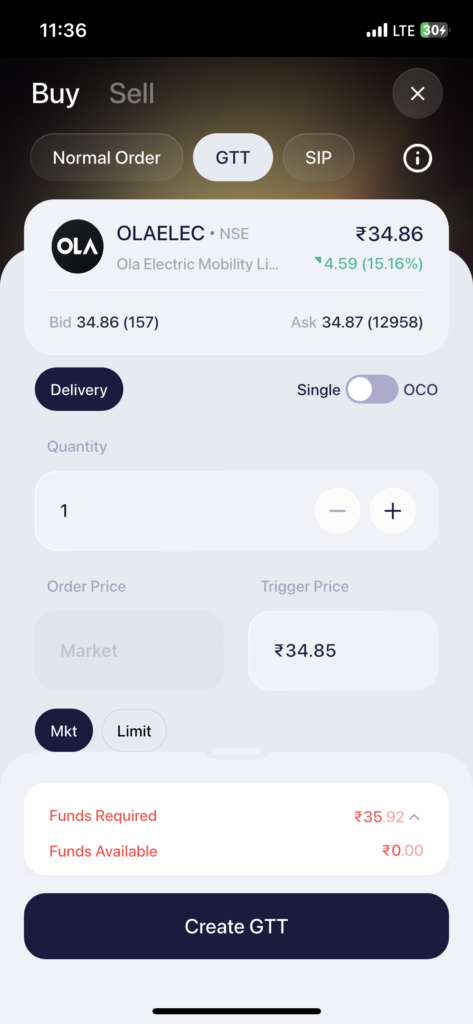
- On the order placement screen, tap GTT at the top (next to Normal Order and SIP)
- The product type will be set to Delivery by default
- Select between Single or OCO using the toggle:
- Single – one trigger price for a buy or sell order
- OCO – available only when placing a sell GTT on stocks you already hold. Lets you set both a target price and a stop-loss simultaneously so your exit is managed automatically
- Enter the Quantity
- Set the Trigger Price – the price at which you want the order to activate
- Set the Order Price – the price at which the order should execute once triggered (select Mkt for market price or Limit for a specific price)
- Check the Funds Required and Funds Available at the bottom
- Tap Create GTT to save your order
Your GTT will now appear under the GTT tab in the Orders section and will remain active until triggered or cancelled.
 Easy & quick
Leave A Comment?