



How can I revoke my E-DIS sale request?
When you place a CDSL E-DIS Sale Request for a scrip, it authorises Samco to debit those shares from your demat account for the sale. If you change your mind and want to cancel that authorisation before the trade is executed, you can place a Revoke Request directly from your Holdings page on Samco Star.
Note: This option is available only when a CDSL E-DIS Sale Request is already pending for a scrip. If no sale request has been placed, the Revoke Request option will not appear. This feature is available on the Samco Star.
Steps to place a Revoke Request
Step 1: Log in to Samco Star
Visit star.samco.in and log in with your User ID and password.
Step 2: Go to Holdings
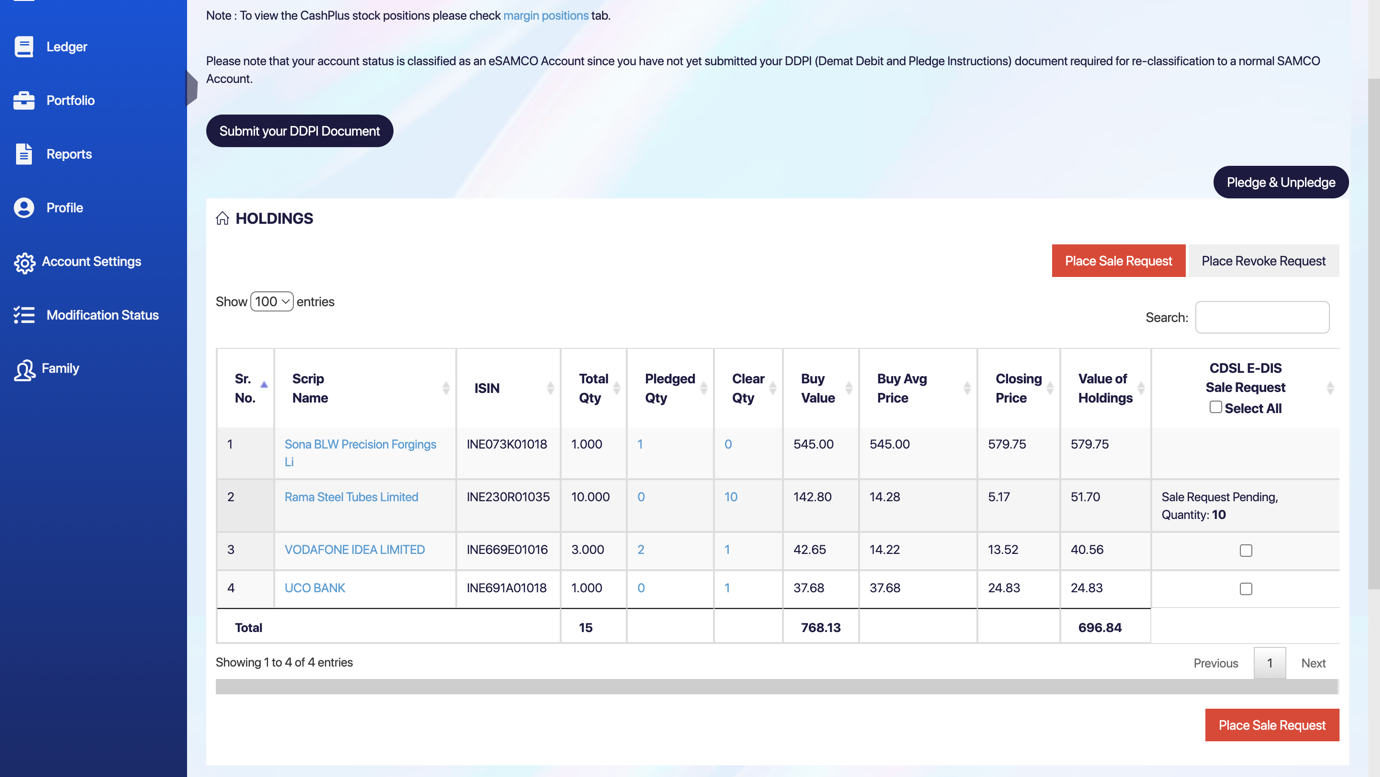
From the left navigation menu, click on Portfolio and then select Holdings. This will display all stocks held in your demat account.
Step 3: Identify the pending sale request
Look at the last column on the right — CDSL E-DIS Sale Request. Any scrip with a pending authorisation will show “Sale Request Pending, Quantity: X” in that column.
Step 4: Click “Place Revoke Request”
At the top right of the Holdings section, you will see two buttons — Place Sale Request (in red) and Place Revoke Request (in white/outlined). Click Place Revoke Request.
Step 5 : Complete authorisation on the CDSL portal
You will be redirected to the CDSL portal to authenticate the revoke request. Enter your TPIN or the OTP sent to your registered mobile number to confirm. Once authenticated, the revocation is submitted and the status in the CDSL E-DIS Sale Request column will update accordingly.
Still have questions? We've got you
Just raise a ticket and our support team will get back to you with exactly what you need.