


How can I act on Pending Actions such as KYC Pending and Awaiting First Investment on the Partner Portal?
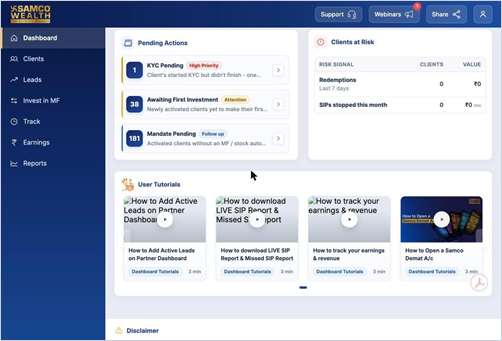
Pending Actions is your daily to-do list. It highlights clients who need a follow-up from you, with a count for each item.
Where to find it: Dashboard > Pending Actions
Key points
- KYC Pending (High Priority): clients who started KYC but did not finish. Opens Leads, where you can help them complete it.
- Awaiting First Investment (Attention): newly activated clients who are yet to make their first investment.
- SIP Failed (Urgent): SIPs that bounced this month. Opens Missed SIP under Track.
- Mandate Pending (Follow up): activated clients without an MF or stock auto-debit mandate. Opens Track > Mandate Details.
- Click the arrow on any item to go straight to the right page. Items with a count of zero are hidden.
Still have questions? We've got you
Just raise a ticket and our support team will get back to you with exactly what you need.