


How can I read the Total Points and Current Month Points figures on the Partner Portal?
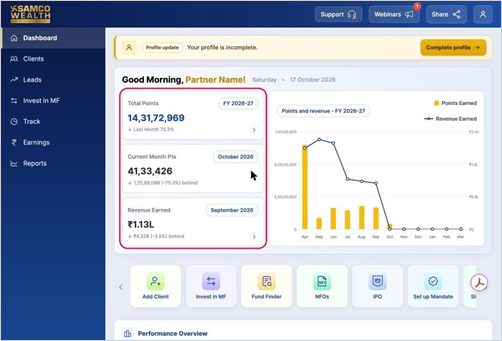
The first two cards on your Dashboard show the points you have earned. Total Points covers the full financial year so far, and Current Month Pts covers the running month.
Where to find it: Dashboard > Total Points / Current Month Pts
Key points
- Total Points: all points earned in the financial year shown on the card (for example, FY 2026-27).
- Current Month Pts: points earned so far in the current month.
- The small line below each figure shows how you compare with the previous month.
- Click the arrow on the Total Points card to see how your points are split across Activation, Equity, Mutual Fund and Debt.
Still have questions? We've got you
Just raise a ticket and our support team will get back to you with exactly what you need.