


How can I see how my points are calculated on the Partner Portal?
The Points Contribution Summary shows how many points you have earned in each category and the rules used to calculate them.
Where to find it: Dashboard > Total Points card > arrow
Steps
- On your Dashboard, click the arrow on the Total Points card.
- At the top, see your points split into Activation, Equity, Mutual Fund and Debt.
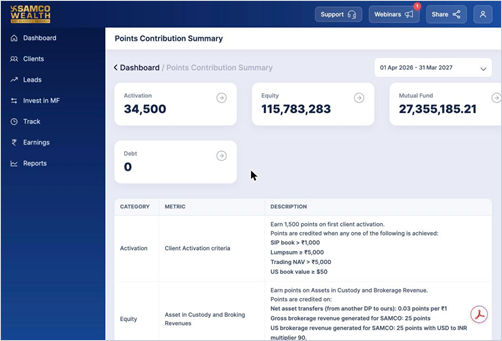
- Use the date selector at the top right to change the period.
- Scroll down to see the rules for each category.
Good to know
- Activation: 1,500 points on first client activation.
- Equity: points on net asset transfers, gross brokerage, US brokerage and IPO applications.
- Mutual Fund: 1 point per ₹1 of net sales (purchases minus redemptions).
- Debt: 0.02 points per ₹1 invested in Fixed Deposits.
Still have questions? We've got you
Just raise a ticket and our support team will get back to you with exactly what you need.