


How can I use the SIP Calculator and invest from it for a client on the Partner Portal?
The SIP Calculator helps you show a client how their money could grow. It also covers Lumpsum, Step-Up SIP, SWP and STP.
Where to find it: Dashboard > SIP Calculator
Steps
- On your Dashboard, click SIP Calculator.
- Choose the calculator type: SIP, Lumpsum, StepUp SIP, SWP or STP.
- Set the amount, expected return rate and time period.
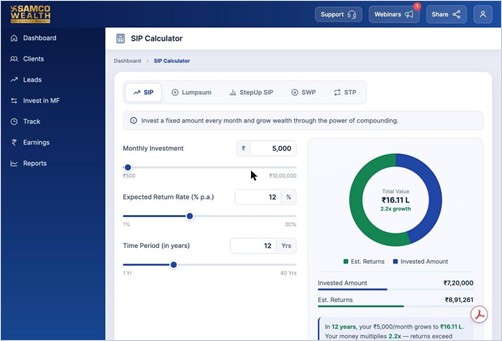
- Review the Total Value, Invested Amount and Estimated Returns.
- Click Invest Now to go ahead with an investment.
Good to know
- Returns shown are estimates based on the rate you enter and are not guaranteed.
Still have questions? We've got you
Just raise a ticket and our support team will get back to you with exactly what you need.