


How can I view active, upcoming and fixed maturity NFOs on the Partner Portal?
The NFO page lists every New Fund Offer available to your clients, grouped by status.
Where to find it: Invest in MF > NFO, or Dashboard > NFOs
Steps
- Click Invest in MF and select NFO, or click NFOs on your Dashboard.
- Use the tabs to switch between Active NFOs, Upcoming NFO / FMPs and Fixed Matured Plan.
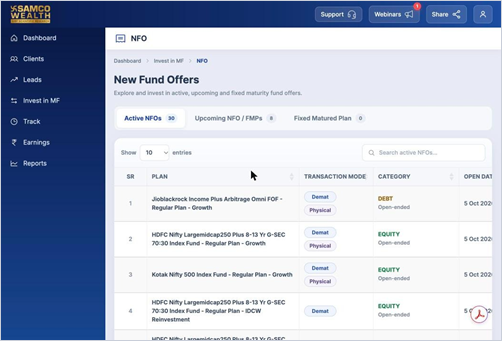
- Check the plan, transaction mode, category, open and close dates, T30 Trail and minimum investment.
Still have questions? We've got you
Just raise a ticket and our support team will get back to you with exactly what you need.