


How can I submit my annual self-declaration for the financial year on the Partner Portal?
Every financial year, you need to submit a Declaration of Self-Certification (DSC), also called Form No. B. It confirms that you follow the SEBI and AMFI code of conduct for mutual fund distribution. When it is due, an Action required banner appears on your Dashboard.
Where to find it: Dashboard > Action required banner > Complete now
Steps
- On your Dashboard, click Complete now on the self-declaration banner.
- Read the instructions on the Declaration of Self Certification page.
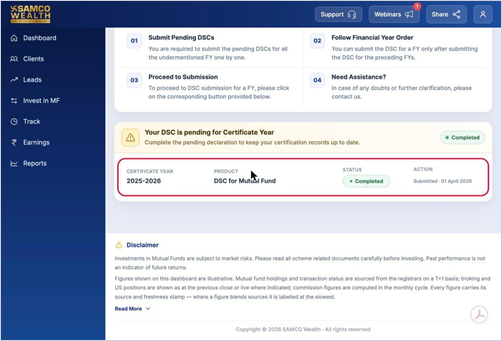
- In the list, find the pending Certificate Year and click Declare Now.
- Read the declaration carefully.
- Tick the box to confirm that you have read and agree to the Terms and Conditions and Privacy Policy.
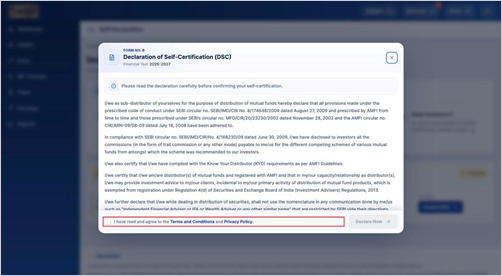
- Click Declare Now to submit.
Good to know
- If more than one year is pending, submit them one at a time, starting with the oldest year.
- Once submitted, the Status changes from Pending to Completed and the submission date is shown under Action.
Still have questions? We've got you
Just raise a ticket and our support team will get back to you with exactly what you need.