


How can I add my EUIN details on the Partner Portal?
Your EUIN (Employee Unique Identification Number) is issued by AMFI and identifies the person who advises the client on a transaction. You can add it from the EUIN Details page.
Where to find it: Profile icon > EUIN Details
Steps
- Click the profile icon at the top right and select EUIN Details.
- Under Add EUIN / SIF Details, keep Type as EUIN.
- Enter the Name, EUIN Number, Valid From and Valid To dates.
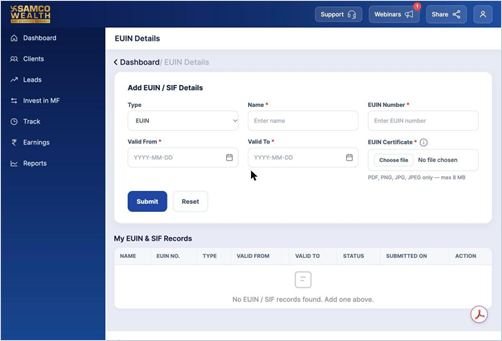
- Upload your EUIN Certificate.
- Click Submit. Your record appears under My EUIN & SIF Records.
Good to know
- Certificate formats: PDF, PNG, JPG or JPEG, up to 8 MB.
- Not sure where to get the certificate? Click the i icon next to EUIN Certificate for a sample and a step-by-step AMFI download guide.
- Use Reset to clear the form and start again.
Still have questions? We've got you
Just raise a ticket and our support team will get back to you with exactly what you need.