


How can I add SIF details and upload the certificate on the Partner Portal?
If you distribute Specialised Investment Funds (SIF), add your SIF details from the same EUIN Details page. You will need both your EUIN certificate and your SIF certificate.
Where to find it: Profile icon > EUIN Details > Type: SIF
Steps
- Click the profile icon at the top right and select EUIN Details.
- Change Type to SIF.
- Enter the Name, EUIN Number, Valid From and Valid To dates.
- Upload the EUIN Certificate and the SIF Certificate.
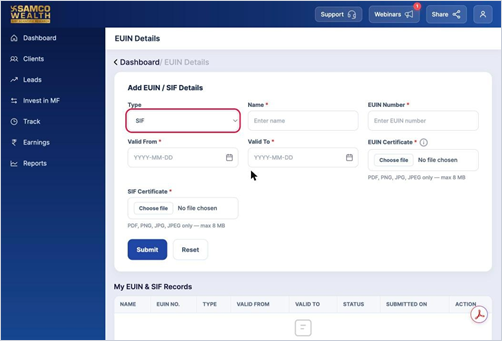
- Click Submit.
Good to know
- Both certificates can be PDF, PNG, JPG or JPEG, up to 8 MB each.
Still have questions? We've got you
Just raise a ticket and our support team will get back to you with exactly what you need.