


How can I add a new client on the Partner Portal?
New clients are added as leads first. Once you add their details, they get the account opening journey, and after their account is open they appear in your Clients list.
Where to find it: Dashboard > Add Client, or Leads > Add Active Lead
Steps
- On your Dashboard, click Add Client. You can also go to Leads and click Add Active Lead.
- Choose the Segment: Broking + Mutual Fund, or Mutual Fund.
- Select the Source: Friend, Event, Relatives, Existing Client, Digital Campaign or Other.
- Enter the client’s Name, Mobile Number and Email ID.
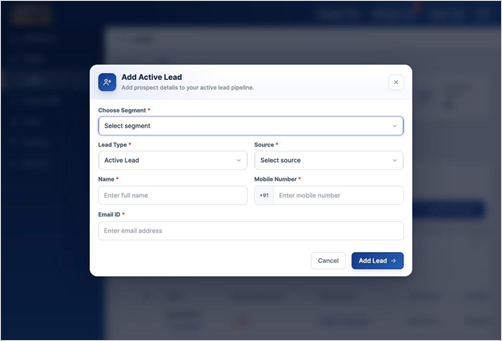
- Click Add Lead.
Good to know
- Mobile number must be a valid 10-digit number starting with 6 to 9.
- You can follow the lead’s progress in Leads.
Still have questions? We've got you
Just raise a ticket and our support team will get back to you with exactly what you need.