


How can I check a client’s Equity Mandate and MF Mandate status on the Partner Portal?
Mandate status is shown for every client on the Clients page, and in more detail in each client’s profile.
Where to find it: Clients > Equity Mandate / MF Mandate columns
Steps
- Click Clients in the left menu.
- Check the Equity Mandate and MF Mandate columns. Yes means a mandate is in place, No means it is not.
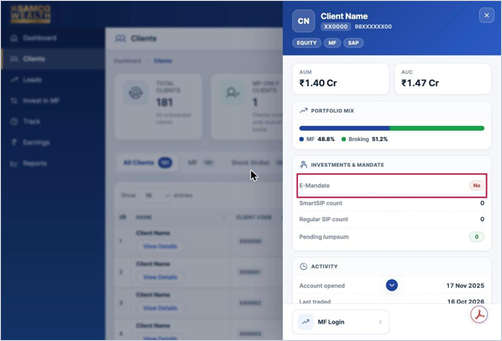
- For more detail, click View Details under the client’s name and see Investments & Mandate.
Good to know
- The client profile also shows the SmartSIP count, Regular SIP count and any pending lumpsum.
- For the full mandate list with status and dates, go to Track > Mandate Details.
Still have questions? We've got you
Just raise a ticket and our support team will get back to you with exactly what you need.