


How can I view my full client list and filter it by MF, Stock (India) or US Stocks on the Partner Portal?
The Clients page lists everyone onboarded under you, with their segments, total assets and mandate status.
Where to find it: Clients (left menu)
Steps
- Click Clients in the left menu.
- Use the tabs above the table to switch between All Clients, MF, Stock (India) and US Stocks. The count on each tab shows how many clients are in it.
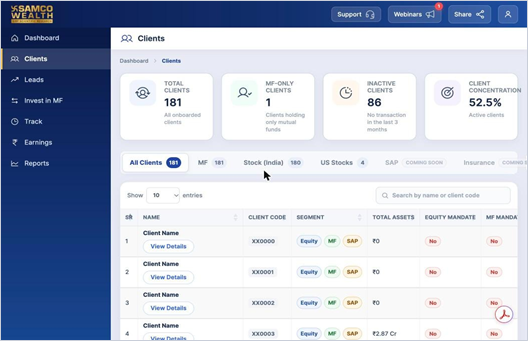
- Use Search by name or client code to find a client quickly.
- Click View Details under a client’s name to see their full profile.
Good to know
- Use Show entries to change how many clients appear on each page.
- If the list shows empty rows for a long time, refresh the page.
Still have questions? We've got you
Just raise a ticket and our support team will get back to you with exactly what you need.