


How can I choose between Demat and Physical transaction mode on the Partner Portal?
The transaction mode decides where your client’s units are held. When a client opens a 3-in-1 account, the mode is set to Demat automatically. The client can change it from their own account.
Where to find it: Client’s account > Manage Account > Transaction Mode
Key points
- Demat: units are held in the client’s demat account.
- Physical: units are held in a folio with the fund house (Statement of Account mode).
- The modes a scheme supports appear as Demat and Physical tags on the scheme and in the NFO list. Some plans support only one mode.
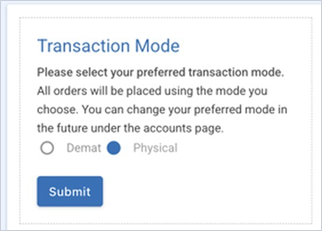
- To change the mode, the client opens Manage Account in their own login, selects Demat or Physical under Transaction Mode and clicks Submit.
Still have questions? We've got you
Just raise a ticket and our support team will get back to you with exactly what you need.