


How can I place a mutual fund order for a single scheme through Single Fund Order on the Partner Portal?
Single Fund Order (Distributor Initiated Transaction) lets you pick a scheme and send a lumpsum investment to one or more clients in a few steps.
Where to find it: Invest in MF > Single Fund Order
Steps
- Click Invest in MF in the left menu and select Single Fund Order.
- Use the filters on the left (AMC, Scheme Type, Sub Type, AUM, investment range) or the search box to find a scheme.
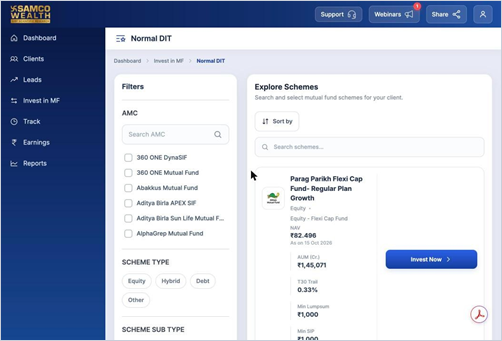
- Click Invest Now on the scheme you want.
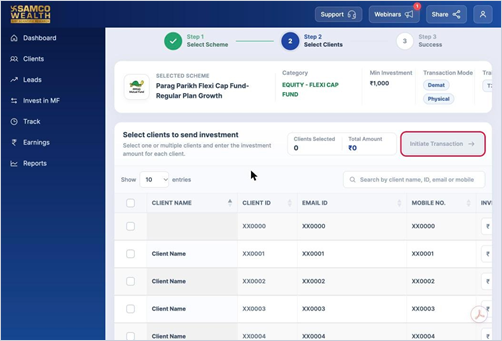
- Tick the clients you want to send the investment to and enter the amount for each client.
- Click Initiate Transaction.
Good to know
- Single Fund Order is for lumpsum orders only. To set up a SIP, use Create Custom Basket.
- The minimum investment for the scheme is shown at the top of the client selection page.
- You can send the same scheme to several clients at once. Clients Selected and Total Amount update as you go.
- Each client receives an approval link by email and SMS, valid for 7 days.
- Track the order under Track > DIT Order History.
Still have questions? We've got you
Just raise a ticket and our support team will get back to you with exactly what you need.