


How can I see fund returns, factsheets or risk levels before recommending a scheme on the Partner Portal?
Fund Finder helps you compare schemes on ratings, rank and returns before you recommend one to a client. Factsheets and riskometer levels are not available in the portal yet.
Where to find it: Dashboard > Fund Finder
Steps
- On your Dashboard, click Fund Finder.
- Filter by Rating, Scheme Type, Scheme Sub Type, AMC or AUM.
- Compare the scheme cards. Each shows its rank, star rating, NAV, AUM, T30 Trail and returns.
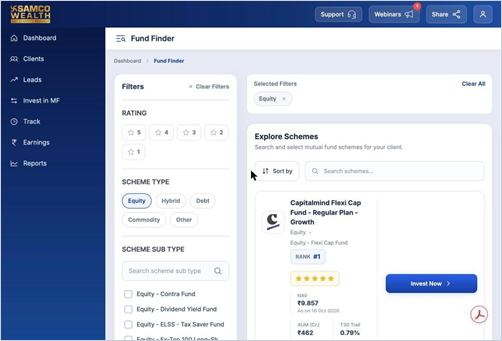
- Click Invest Now to go ahead with a scheme.
Still have questions? We've got you
Just raise a ticket and our support team will get back to you with exactly what you need.