


How can I use a ready-made basket on the Partner Portal?
Ready-made baskets are curated sets of funds built around different goals. You can invest a client in a full basket in one go.
Where to find it: Invest in MF > Ready-made Baskets
Steps
- Click Invest in MF and select Ready-made Baskets.
- Search and select your client.
- Browse the baskets by category, such as Basket of Fortune.
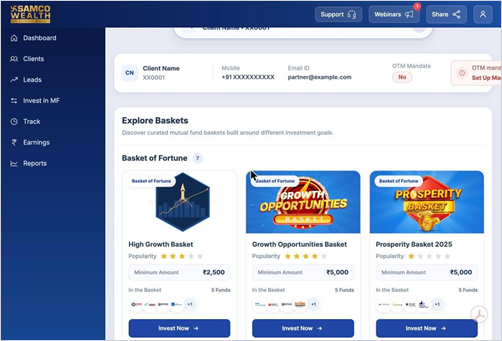
- Open a basket to see its details, returns and underlying schemes.
- Choose SIP or Lumpsum, click Invest Now, review and initiate the order.
Good to know
- Each basket shows its popularity rating, minimum amount and the number of funds in it.
Still have questions? We've got you
Just raise a ticket and our support team will get back to you with exactly what you need.