


How can I add a nominee during empanelment on the Partner Portal?
Adding a nominee is optional. You can add one now or later from your profile.
Where to find it: Empanelment > Step 5 of 6 > Add a Nominee
Steps
- Enter the nominee’s name, relationship, date of birth, mobile number and email ID.
- Select the Nominee Document Type and enter the document number, for example PAN.
- Choose whether the nominee’s address is the same as yours.
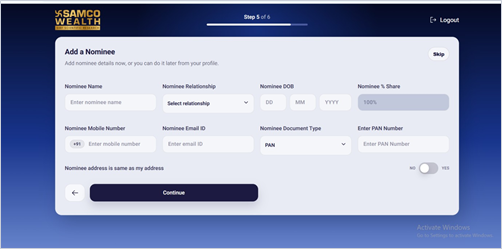
- Click Continue, or click Skip to add a nominee later.
Still have questions? We've got you
Just raise a ticket and our support team will get back to you with exactly what you need.