


How can I add an Active Lead or a Potential Lead on the Partner Portal?
You add both types of leads from the Leads page. Use Active Leads for people ready to open an account, and Potential Leads for prospects you want to follow up with later.
Where to find it: Leads > Active Leads / Potential Leads
Steps
- Click Leads in the left menu.
- For an Active Lead: stay on the Active Leads tab and click Add Active Lead. Choose the segment and source, enter the name, mobile number and email ID, and click Add Lead.
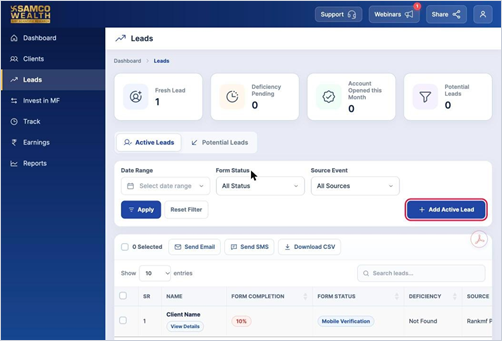
- For a Potential Lead: open the Potential Leads tab and click Add Potential Lead.
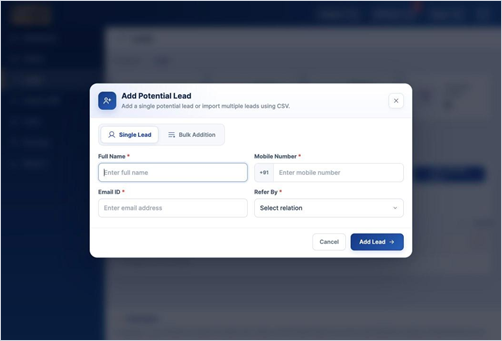
- Choose Single Lead to add one person, or Bulk Addition to upload a CSV. For a single lead, enter the full name, mobile number, email ID and Refer By, then click Add Lead.
Good to know
- You will see a confirmation once the lead has been added.
Still have questions? We've got you
Just raise a ticket and our support team will get back to you with exactly what you need.