


How can I add my SIF certificate and GST number during empanelment on the Partner Portal?
You can add your SIF certificate and GST number on the ARN page, after uploading your ARN document.
Where to find it: Empanelment > Step 4 of 6 > ARN Verification
Steps
- If you have a valid SIF certificate for mutual fund distribution, switch the toggle to Yes and upload the certificate.
- If you have a GST number, switch the toggle to Yes and enter your GST number.
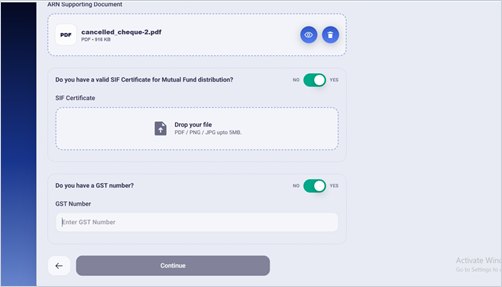
- Click Continue.
Good to know
- Both are optional. Leave the toggles on No if they do not apply to you.
- You can also add them later from your profile on the Partner Portal
Still have questions? We've got you
Just raise a ticket and our support team will get back to you with exactly what you need.