


How can I complete my KYC through DigiLocker during empanelment on the Partner Portal?
Your KYC is completed online through Digio, which fetches your Aadhaar and PAN records from DigiLocker. It is fast, paperless and secure.
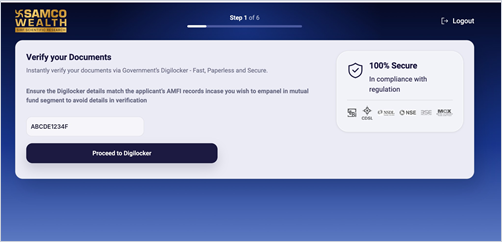
Where to find it: Empanelment > Step 1 > Verify your Documents
Steps
- Enter your PAN and click Proceed to Digilocker.
- On the Digio KYC Verification page, select DigiLocker and click Submit.
- Review the documents that will be fetched (Aadhaar Card and PAN Verification Record), tick the consent box and click Proceed.
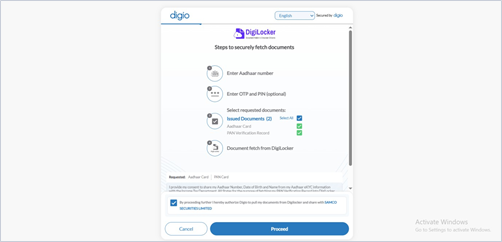
- Enter your Aadhaar number and click Next.
- Enter the OTP sent to your Aadhaar-linked mobile number and click Submit. If you already have a DigiLocker account, enter your 6-digit security PIN instead.
- Wait while your documents are fetched. Do not refresh or close the window.
Good to know
- The Aadhaar OTP is valid for 10 minutes.
- If you plan to distribute mutual funds, make sure your DigiLocker details match your AMFI records, to avoid problems during verification.
Still have questions? We've got you
Just raise a ticket and our support team will get back to you with exactly what you need.