


How can I confirm my PAN and Aadhaar details during empanelment on the Partner Portal?
Once DigiLocker shares your documents, your PAN and Aadhaar details are shown for you to review before you continue.
Where to find it: Empanelment > Step 1 of 6 > Confirm your PAN & Aadhaar Details
Steps
- Check your name, PAN, date of birth and Aadhaar number.
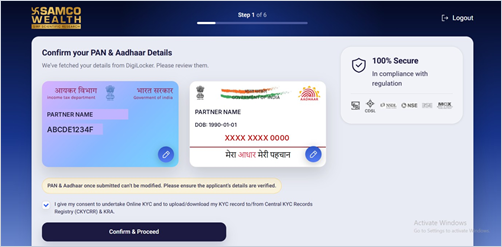
- Tick the box to give your consent for online KYC and the Central KYC Records Registry (CKYCRR) and KRA.
- Click Confirm & Proceed.
Good to know
- PAN and Aadhaar details cannot be changed once submitted, so please check them carefully.
Still have questions? We've got you
Just raise a ticket and our support team will get back to you with exactly what you need.