


How can I empanel as a non-individual entity such as an HUF, LLP, partnership firm or company on the Partner Portal?
Non-individual entities follow their own empanelment journey, with entity details, authorised signatories and entity documents.
Where to find it: samcowealth.com > Empanel with SAMCO > Select Entity Type
Steps
- Select your Entity Type, enter your mobile number and verify it with the OTP.
- Verify your email ID with an OTP or a verification link, or sign up with Google.
- Enter the PAN of the entity. It is validated, and some entity details may be fetched automatically.
- Fill in the entity details and add your authorised signatories.
- Add the entity’s bank account and upload a cancelled cheque.
- Select the business segments: Mutual Funds, Broking or both.
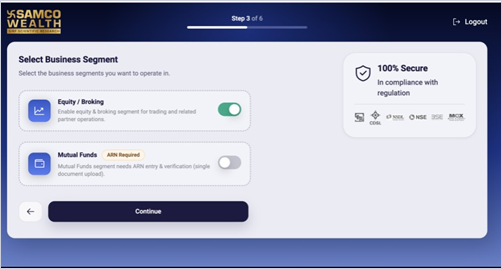
- For Mutual Funds, enter and verify the ARN. The MFD type is set automatically based on your entity type.
- Upload the documents required for your entity type.
- Review the agreement and complete the e-sign using Aadhaar OTP.
Good to know
- On the Thank You page, an application ID is generated and a confirmation is sent by email and SMS.
- Broking is not mandatory. You can choose Broking, Mutual Funds or both.
Still have questions? We've got you
Just raise a ticket and our support team will get back to you with exactly what you need.