


How can I verify my ARN during empanelment on the Partner Portal?
If you select Mutual Funds, you verify your ARN (AMFI Registration Number) and upload a supporting document.
Where to find it: Empanelment > Step 4 of 6 > ARN Verification
Steps
- Check the Type of MFD. It is set based on your entity type, for example Individual.
- Enter your ARN number and click Verify. Once verified, your EUIN number is shown below the ARN.
- Under ARN Supporting Document, upload your ARN document.
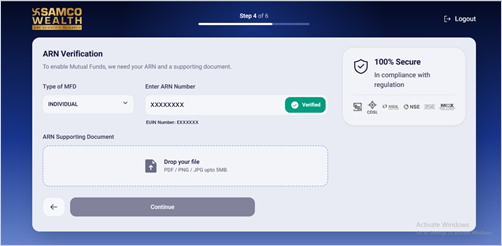
- Click Continue.
Good to know
- The ARN document can be a PDF, PNG or JPG, up to 5 MB.
- This step appears only if you switched on Mutual Funds.
Still have questions? We've got you
Just raise a ticket and our support team will get back to you with exactly what you need.