


My mobile number or email ID does not match my ARN records, what should I do on the Partner Portal?
If the mobile number and email ID in your application do not match the details registered with your ARN, an ARN Verification message appears. You need to verify either the mobile number or the email ID registered with your ARN to continue.
Where to find it: Empanelment > Step 4 of 6 > ARN Verification
Steps
- Read the message, which shows the details in your application.
- Select either the Mobile number or the Email Id shown As per ARN.
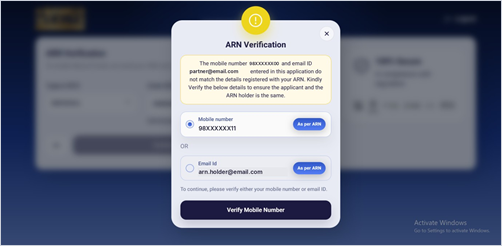
- Click Verify Mobile Number or Verify Email Id and enter the OTP.
Good to know
- This check makes sure the applicant and the ARN holder are the same person.
- You cannot continue without completing this verification.
Still have questions? We've got you
Just raise a ticket and our support team will get back to you with exactly what you need.