


How can I check mandate details and approval status on the Partner Portal?
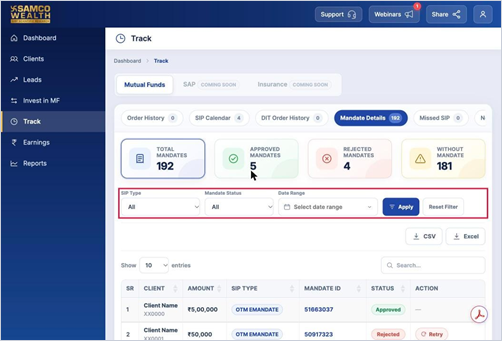
Mandate Details lists every mandate set up for your clients, with its type and approval status.
Where to find it: Track > Mandate Details
Steps
- Click Track in the left menu and open Mandate Details.
- See Total Mandates, Approved Mandates, Rejected Mandates and clients Without Mandate on the cards at the top.
- Filter by SIP Type (SIP, OTM, UPI or SmartSIP mandate), Mandate Status (Approved, Pending or Rejected) and date range, then click Apply.
Still have questions? We've got you
Just raise a ticket and our support team will get back to you with exactly what you need.