


How can I see client-wise net sales on the Partner Portal?
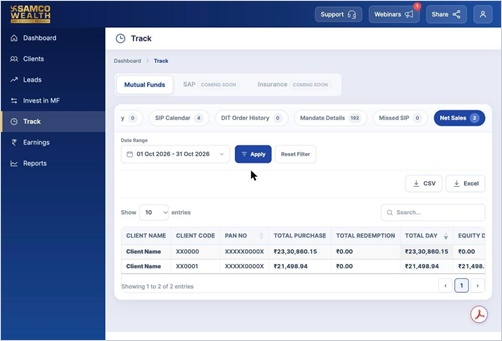
Net Sales shows, for each client, total purchases, total redemptions and the net figure for the period you choose.
Where to find it: Track > Net Sales, or Dashboard > Net Sales (MF) card
Steps
- Click Track in the left menu and open Net Sales. You may need to scroll the tabs to the right.
- Choose the date range and click Apply.
- Check Total Purchase, Total Redemption and the net sales by category for each client.
Good to know
- Net sales drive your Mutual Fund points (1 point per ₹1 of net sales).
Still have questions? We've got you
Just raise a ticket and our support team will get back to you with exactly what you need.