


How can I view upcoming SIP debits in the SIP Calendar on the Partner Portal?
The SIP Calendar shows every SIP due for your clients, day by day, so you know what is coming up.
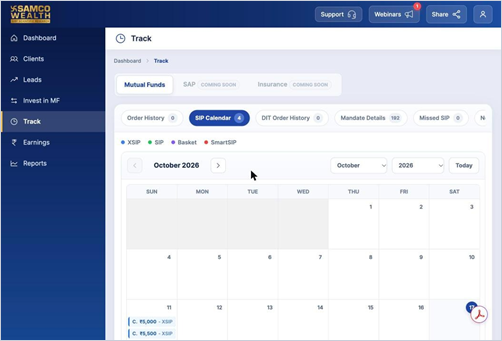
Where to find it: Track > SIP Calendar
Steps
- Click Track in the left menu and open SIP Calendar.
- Use the arrows or the month and year selectors to move between months. Click Today to come back.
- Each day shows the client, amount and SIP type. Click +more to see all SIPs on a busy day.
- Scroll down for the same SIPs in a list, which you can download as CSV or Excel.
Good to know
- Colours show the SIP type: XSIP, SIP, Basket and SmartSIP.
Still have questions? We've got you
Just raise a ticket and our support team will get back to you with exactly what you need.