


How can I find clients who missed a SIP on the Partner Portal?
Missed SIP lists every SIP that could not be debited, so you can follow up with the client quickly.
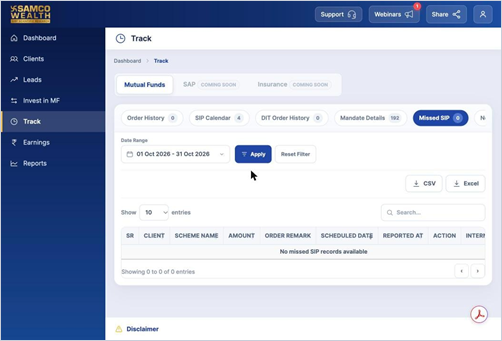
Where to find it: Track > Missed SIP, or Dashboard > Pending Actions > SIP Failed
Steps
- Click Track in the left menu and open Missed SIP.
- Choose the date range and click Apply.
- Check the client, scheme, amount, scheduled date and the Order Remark for the reason.
Good to know
- When SIPs fail in the month, they also appear under SIP Failed in Pending Actions on your Dashboard.
Still have questions? We've got you
Just raise a ticket and our support team will get back to you with exactly what you need.